Idézet: multibit - Dátum: 2008. máj. 30., péntek - 9:02
Nyitott vagyok mindenre. Kipróbálok bármilyen variációt, ha ez segít

Igen, a régiek ugyanezekben a foglalatokban voltak. Mint írtam, azokkal nem jött ez a hiba.
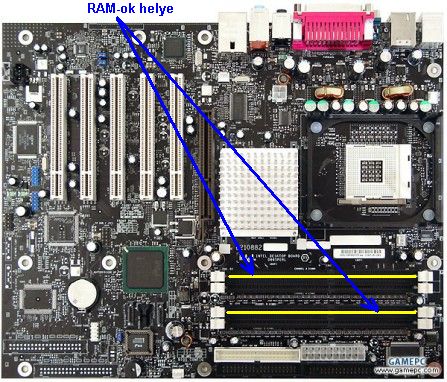
Az alaplapom Intel D865PERL típusú. A doksi szerint ha a 4 slotból kettõ van használva, akkor dual-mûködéshez a modulokat azokba a slotokba kell tenni, ahol most vannak, tehát a sárgával jelölt helyekre.
A furcsa az, hogy csak ritkán panaszkodik a gép. Az esetek többségében símán indul.
Ok, próbálj ki mindent, de azért még nézd meg ezt:
Dual Channel Configuration
Before installing DIMMs, read and follow these guidelines for dual channel configuration.
Install a matched pair of DIMMs equal in speed, size, and technology (see Figure 7) in
DIMM 0 in both channels A and B.

[
Kattints ide a teljes méretû képhez ]
NOTE
All other memory configurations will result in single channel memory operation.
Installing DIMMs
CAUTION
Install memory in the DIMM sockets prior to installing the AGP video card to avoid interference
with the memory retention mechanism.
To install DIMMs, follow these steps:
1. Observe the precautions in “Before You Begin” on page 27.
2. Turn off all peripheral devices connected to the computer. Turn off the computer and
disconnect the AC power cord.
3. Remove the computer’s cover and locate the DIMM sockets (see Figure 9).
4. Remove the AGP video card if it interferes with the DIMM retaining clips from being easily
opened and closed.
OM15478
DIMM 1
DIMM 0
Channel A
DIMM 1
DIMM 0
Channel B
Figure 9. Installing a Memory Module
5. Make sure the clips at either end of the DIMM socket(s) are pushed outward to the
open position.
6. Holding the DIMM by the edges, remove it from its anti-static package.
7. Position the DIMM above the socket. Align the small notch at the bottom edge of the DIMM
with the keys in the socket (see inset in Figure 9).
8. Insert

[
Kattints ide a teljes méretû képhez ]
9. When the DIMM is inserted, push down on the top edge of the DIMM until the retaining clips
snap into place. Make sure the clips are firmly in place.
10. Reinstall the AGP card if it was removed prior to installing the DIMMs.
11. Replace the computer’s cover and reconnect the AC power cord.

 Súgó
Súgó

 A téma zárva.


 .
.




 (konfig adatlapon)


